MultiplyのTwitterイラスト検索結果。 58ページ目

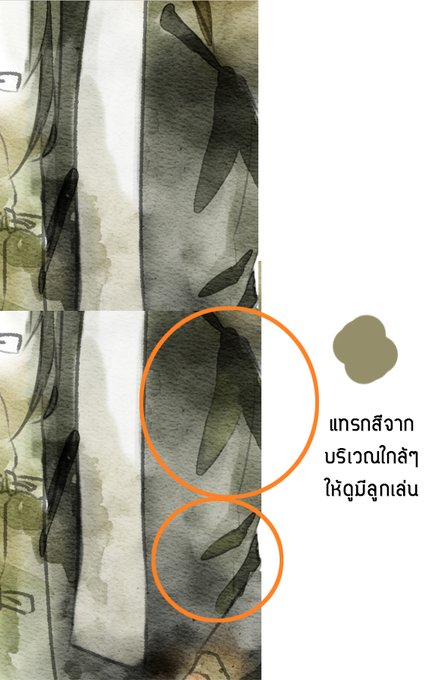
3) ลงเงา
เปิดเลเยอร์ Multiply ไว้ด้านบนแล้วปรับ Layer Property ให้เป็นขอบสี สีที่ใช้เป็นเงาก็ดูดจากสีพื้น ไม่ต้องใช้สีเข้มมากเพราะมันเป็น Multiply อยู่แล้ว
อีกเทคนิคหนึ่งที่จะทำให้เหมือนสีน้ำมากขึ้นคือการแทรกสีที่อ่อนกว่าลงไปบนเงา
(+)


Doing this and then coloring using a multiply layer overtop is fun!


@queentoriel i just simply slap a multiply layer or purpley overlay on all my paintings n call it a day <3


Slime 4 attacks!
Dodged!
Your attack missed!
Slime 14 burrowed!
Your attack missed!
Slime 22 burrowed!
Your attack missed!
Slime 6 Burrowed!
Youre stunned and cannot attack!
Slime 18 used 'multiply'!
@CaraioTheCaraio Not doing so well this encounter, reload a save?~


Step two: I realize that I am looking like shit and I decide to go back to my usual technique, which consists of putting a layer in multiply mode and painting like a fucking 5 year old in dark colors


Hehe, I've learned about add, multiply and overlay layers and am currently enjoying it waaay to much playing around with those. Here, have a sunset colored Mu~
#AHatinTime #ahit
#MustacheGirl


Here's an added image texture through a low opacity multiply layer (experimenting with that).



i'm having A Time tonight but realized i can just slap multiply layers onto sketches to color them i'm feeling the p o w e r


there are 2 kinds of shading
using multiply vs using soustraire and reduce the opacity https://t.co/hpAO5x5iK0


[ danny phantom ] 2 versions bc the multiply layer makes it harder to see the rendering


101/365 #DrawEveryday2021
Back to digital things- no brain drawing but wanted to play with how I did highlights and shadows/trying out different colours and layer styles than my normal "default" purple + multiply.


Early morning flock
8”x6” oil on board #dailypainting
.
My sheep paintings are multiplying and I’m loving do them.
.
All my daily paintings are available for £125 and dry enough to send in 3-4 weeks
.
#flock #sheep #sheepfarming #morning #morninglight #wales #oilpainting #art


My art bunnies are now available as greetings card bundles and A4 print - they’re multiplying like, er, WABBITS
Cards
https://t.co/llkwGUjThZ
prints
https://t.co/EC3uMIjS11
#ukgiftam #ukgifthour

