MultiplyのTwitterイラスト検索結果。 82ページ目


wanted to try shading with only multiply (n add glow) for once so here's some @Condifiction doodles awawaa


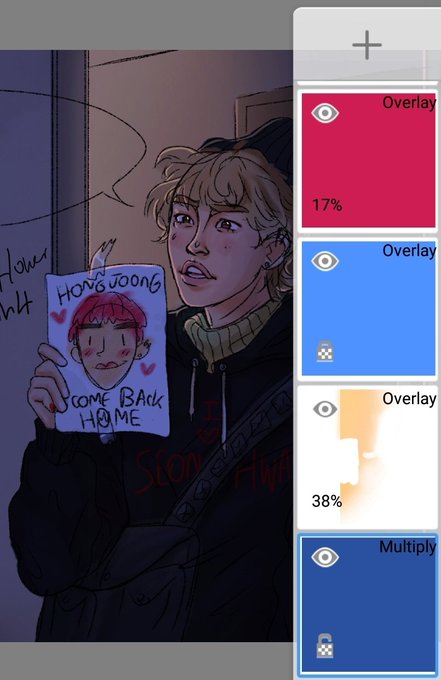
WIP screenshots from coloring Scott and Kirstin.
My digital coloring hacks: use a separate multiply layer*, and alpha lock the layer you're coloring on.
*Line art on a multiply layer above coloring, OR coloring on multiply layer above the white-filled line art. Either works!


Confined, we make useless signals
And no voice breaks the ring
Of solid darkness.
But who listens?
We are a house of dispair
And death;
Useless scaffolding to crown consumption.
And we grow and multiply.
G.O.R.
#filavandrelappreciationday #TomCanton #TheWitcherNetflix


“Now you're part of the band
That they've got get your peas in a pod and you'll
Multiply and divide”



6. Leave the lighting for last/ do it on separate layers
It's much easier to color using your regular base colors then adding your lighting than trying to get the right blue for the skintone,
multiply and overlay your colors and add highlights and reflections after!


@Crystal_Neptune Oh, and if you don't divide and multiply the brightness value, the model ends up looking really flat since the brightness values above 1 get thrown away in the ColourRamp.


@andrewpprice One way to go about it, break things down into local values, then do a shadow pass on multiply, and then light. After you have established some kind of base with this method it’s easier to push the lighting after.


too lazy to commit to actually adding values to anything anymore so I just use the shortcut I learned like 14 years ago which is: multiply layer and color dodge layer and then go to bed


not shaded drawing now VS not shaded drawing december 2019
(by shading i mean the multiply, cell shading layer)
in like 3 days i discovered i can go more far with coloring!
i can say im proud if myself :,)


Marilyn Monroezesca q eu tinha desenhado no papel ai decidi passar umas layers de multiply no desenho pra "pintar"
EH MO LEGAL


Experimenting with colors, using few layers and mixing only Multiply, Screen and Overlays.
This was inspire by @Tedesayuno and her Kitty Socras


@zonakaryaid coba gini aja nder, itu base colornya dicopy jadi multiply, dihapus pakai soft eraser (kalau pakai csp) terus turun in opacity nya, habis itu new layer tetap multiply dan buat cloth fold nya masih pakai base color kalau agak belibet boleh banget kok japri


@PerezAl91025416 @_shugabunny Thank you!
Shading.... combos?
I usually use a brown-lavander-greyish color on a multiply layer, then use 1-2 more multiply layers to darken specific parts, play around with opacity. I’m terrible at highlights so I used a clipped add layer (gold) on the flat colors


i used to set lineart to multiply, but that gave me extra work w/ transparent bgs. these days i use a blendy brush. gives it a nice painterly look imo?? and u dont have to be super precise!








before vs. after shading -- it makes all the difference!!! just "multiply" layer the shit outta that bitch


