exportのTwitterイラスト検索結果。 97ページ目


Have a toxic boi!
(Hoping the export doesn’t fuck up the saturation this time lol)
#Procreate5X #pokemon #PokemonSwordShield #toxtricity


Please help @Procreate After updating the app yesterday, all my CYMK colour profiles have switched to "U.S. Web Coated (SWOP) v2" and cannot be reverted back in the program or in photoshop (left example)😭 Also a bunch of my RGB files export with this same issue (right example)


Super excited to announce the release of the EveryPoint app! Currently it supports mesh reconstruction using a LiDAR-enabled iPad, and exporting the scanned model to a PLY file. Updates are coming shortly to support more devices, more scanning modes, etc.
https://t.co/RtnovoS1V3

@Procreate These are both exported as PSDs. The one on the left was left after update, right before update.
The colours are corrupt before I even open the file, so backing up without opening them doesn't seem to help either. Is there anyway to revert back to before the Procreate Update? 😭

Perdon si molesto pero mi google no abres y solo pregunto es para un examen
Cuáles son las mayores exportaciones de mexico🇲🇽 a canada🇨🇦 y estadus Unido 🇺🇸


Feel pretty happy bout this frame im doing for a storyboard. Mala mia por el low res es que no queria exportar la imagen


First #csp piece. Saving and exporting is hella frustrating rn blahhh.
#clipstudiopaint #sketch #furryart #doodle #hadshot #symmetry #fox #newartprogram #anthroart #fursonartwork #idkwhatimdoing #flatcolor


OH GOD THE QUALITY IS A NIGHTMARE... i don't want to export each step as a video so i'll just. export my current step to a video


So someone ask what she wears underneath her work uniform and..
I realized I double layer through eye in the 2nd one XD when I exported it.
So.. Idk what to tag this.....


The export of handloom products from India was valued at US$ 343.69 million in FY19. In FY20 (till November 2019), the exports stood at US$ 226.05 million.
#welfareforweavers #local4global #vocal4handmade


Ahri from K/DA that I’ve been working on. When I exported the photo it turned a different colour?? Also I deleted it half way on concepts and had to restart on paint tool sai. Surprise at the end which was the reason I didn’t save my drawing @KDA_MUSIC


Highly detailed, rich in various ornaments, furnishings props with 4K resolution PBR texture sets and optimal geometry. Each model has its own individual material that contains unique texture maps exported from Substance Painter for every model. https://t.co/TvRhWOsqkR


#100percentzoom
I do like my canvases big so nobody will see how the mess after I export in 50% or less :D


Ahoy, Muties!
"Call me Kate" and her crew set sail for the high seas on a black market import-export mission.
It's X-Lapsed, Episode 14... talkin' Marauders #1!
https://t.co/tF9SkcA609


And lastly this old Veronica animation I did... I rarely draw her or even THINK about animation, and the one time I did its for porn lmao.
I had a version that had voice work but quite frankly the video quality was terrible XD The VA did great! I just was a dummy exporting it.


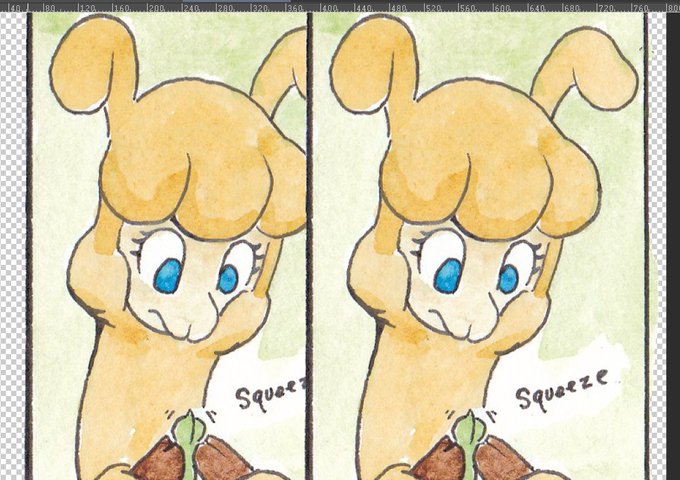
Today I learned the JPG files compress with loss of quality while PNG/TIF don't. All of my comics until now were exported as JPGs, but now I'm bugged that the quality of my comics uploaded may have been affected. I can't really see a difference though. (1st JPG/PNG, 2nd JPG/TIF)


i usually draw big and i animate some of them too, so you can only imagine my toil when i start to export things #100percentzoom


@KijiArt This *was* a WIP, but when I went to export it, I decided to wrap it up. I'm just getting my feet back under me as far as art is concerned!


through many trials and tribulations i finally have a preview i can show you guys! ty lumi for sitting through this with me agggh we tried so many things to get this to finally export right