opacityのTwitterイラスト検索結果。 1,333 件中 48ページ目


@BrandooJojo 1. Grayscale
2. Color layer set to normal
3. Color layer set to color
4. Color layer set to desired opacity for the theme of the piece whether it be colorful or dreary.
I would also do separate color layers for light sources depending on their color.
Does this help?


Base colors, with the lighting, and with the shadows at 80% opacity


here is example of depth btw. i have a lot of dark areas but a loooot of low opacity shapes that u can barely see, like the eyes heart has a heart inside of it. u have no idea how many layers this was haha...


throw a color layer on there at 25% opacity and call that shit done! for my byleth loving friends, a year later lol
very loose paint and sketch~
#FireEmblemThreeHouses #Byleth #t3t0bean


@tvidotto And one more, I know chances are super low, but if you anyway will do experiments with shaders would be awesome to have some sort of opacity for some heroes, like default body of Visage.


will actually talk about some thoughts that went into making this. Hopefully this will also explain why I may draw fanart of some characters, but not others even though I like both. So let's get started.
Here's the image with a lowered opacity on the colors for visibility.


#jossend2
Here is my little fursona using Joss’s color palette.
I really think I outdone myself on this one!!!
I also used white and black along with some lighting and shading plus changing opacity for some colors.


Opacity 🌌
Watercolor and ink illustration
#watercolor #Watercolour #illustration #tuulintu


Mess with blending modes! This is in overlay. Just see how they look! Then knock it down to a low opacity, I usually go just under 15%.


matsun had a friend over at work
-------------------------
artstylebend! tadah!
something not fun or happy, with high opacity but not bright colors, strokes, a face and not so minimalistic! https://t.co/8KWCOmunZ0



@bunnyytabs No beb, like turn it into "Overlay" and just set it at 50% opacity, then just stick it to the actual drawing. kinda like ung mga ginagawa ko???


(Yes, I know the Goomba looks terrible).
Anyway, my plans were to recreate the original Paper Mario's box art using the TTYD promotional artstyle. At the moment, I've got the original art as a background layer with about 50% opacity. This will be removed in the final picture.


@dsamowen Another way to do it, is to just use the studio pen with the opacity lowered and the noise smudge tool. Like what Oda likes to do in recent Jump covers

@dsamowen First do your flat colors. Then use the studio brush and have a low opacity when shading colors and use it like any other marker. After that use the smudge tool of the the Noise brush or dry ink brush. But don’t smudge it too much, only bits and pieces.


Igraine 🌿 @TheMarcisz
(Re-upload; had to tweak the opacity of one of the shine layers in her eyes. It got messed up after I saved it as a PSD in order to throw into CSP to edit OTL)


Have yall tried changing the lineart colors?
Switching the lineart colors to match the character will make it appear softer and it looks really good with the skin
Just preserve opacity or clip the different color to your lineart layer uwu
Ft. the Ehwa fanart Im currently doing https://t.co/Co2WRPTdQo

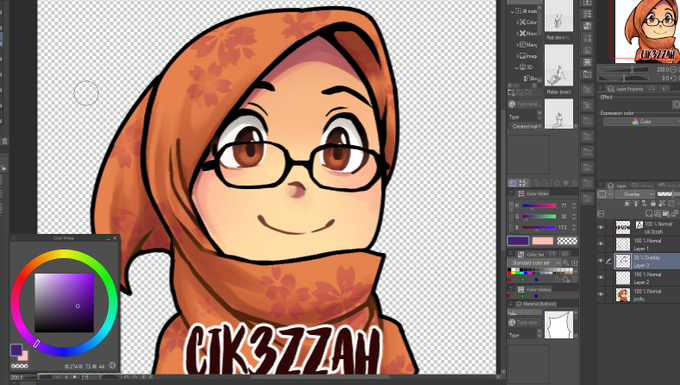
@budakkertas00 lol ntah la klu sesuai dengan preference. kne main2 skit, slalu klu nak kaler shadow kulit amik purple gelap pastu kurang akn opacity dia


